Jianying vs Moyin for Voiceover: Features, Price, Use Cases
Jianying vs Moyin starts with what each product is. Jianying (剪映, the Chinese edition of CapCut) is a video editor, and text reading is one of its many AI tools; its advantage is that voice and edit live in the same project. Moyin (魔音工坊) is a dedicated voiceover tool; its advantage is fine control, with polyphonic characters, pauses, stress and local speed adjustable line by line. For a quick talking-head video or one narration track, Jianying is handier. To get every word of a voiceover right, Moyin fits better. Many people use both: voice in Moyin, then edit in Jianying.
The difference between Jianying and Moyin: one edits, one dubs
Which one is easier depends on how much of your work is voiceover.
Summary from both official sites and Moyin's App Store listing, checked November 2026.
Jianying
Moyin
What it is
Video editor; text reading is one built-in tool
Dedicated AI voiceover editor
Where you voice
Inside the edit project, straight onto the track
In the voice editor, then download and import into an editor
Strength
Editing, reading, subtitles and audio tools in one place
Fine tuning, many voices and styles, dialects
Voices
Popular voices or voice cloning
800+ voices, 1,000+ styles (App Store description)
Price transparency
No public price page
Web prices need login; App Store listing shows member prices
That shapes which jobs each one suits. Jianying's text reading wins on convenience: once the captions are in, pick a voice and it reads them, and if the rhythm is off you drag it on the timeline. Moyin wins on control: which tone a character takes, where to pause half a beat, which word to stress can all be tuned line by line, which suits narration and audio content where pronunciation matters.
00:07:13,000Side by side
Jianying vs Moyin voiceover comparison table
Every cell comes from the official sites (plus Moyin's App Store listing). "Not disclosed" means not found on public pages. The third column is our own product, for reference.
Feature
Jianying
Moyin
AI Drama Voice (third option)
Product type
Video editor with built-in text reading and other AI tools
AI voiceover editor
Multi-character, multilingual dubbing from scripts
Text reading / dubbing
Reads text with popular voices or a cloned voice
Line-by-line editing and preview
Line-by-line dubbing from a script
Tuning: polyphonic / pause / stress / speed
Not disclosed
All (among nearly 20 tuning tools)
Edit a line or its emotion and regenerate it
Voice cloning
Yes
Not disclosed
No
Multi-character casting
Not disclosed
Multiple-speaker tool assigns speakers to sentences; automatic casting not disclosed
Paste a script: characters detected, voices assigned
Emotion / style
Not disclosed
Speakers offer different speaking styles
Emotion tagged on every line, editable
Voice count
Not disclosed
800+ voices, 1,000+ styles (App Store)
Cast library grouped by role type
Dialects
Not disclosed
Yes (Taiwanese, Northeastern, Beijing and more)
No
Foreign languages
Chinese edition not disclosed
Japanese, Korean, German, Russian, French and more; Thai, Vietnamese, Indonesian not disclosed
English, Thai, Vietnamese, Indonesian, Spanish, Portuguese, Japanese, Korean
Subtitles / SRT
SRT export not disclosed
Members download SRT; auto timing tool
SRT exported for every language
Editing and audio tools
Editing, vocal separation, denoise, voice enhance, loudness, AI sound effects
No
No
Export
Exported with the video; standalone audio format not disclosed
Unlimited audio downloads for members; format not disclosed
MP3; all languages as one ZIP
Pricing model
Membership; no public price page
Membership; web needs login. App Store listing: ¥60/month, ¥348/year (not official site)
Allowed for commercial work under the terms of service
Team collaboration
Not disclosed
Team edition available
Not offered
Checked Nov 2026 · Jianying (剪映) and Moyin (魔音工坊) are trademarks of their respective owners and are named here descriptively. Jianying does not publish membership prices, so this page gives none.
One creator may do all four in a week. Here is advice by case, based on features each site publishes.
Talking-head videos and product intros
Start with Jianying. One track and one voice are quickest read right inside the edit project, and its site says text reading can use a cloned voice if you want your own. Only when the script is full of polyphonic characters, proper nouns or selling points that need stress is it worth polishing in Moyin first.
Film recaps and explainers
Either works, depending on what you care about. Jianying has smart recap rough-cut and talking-head cutting tools for speed; Moyin lets you tune pauses and stress line by line to get an explainer's rhythm exact. For dubbing to an original timeline, also see Moyin vs Douge.
Multi-character short dramas and comics
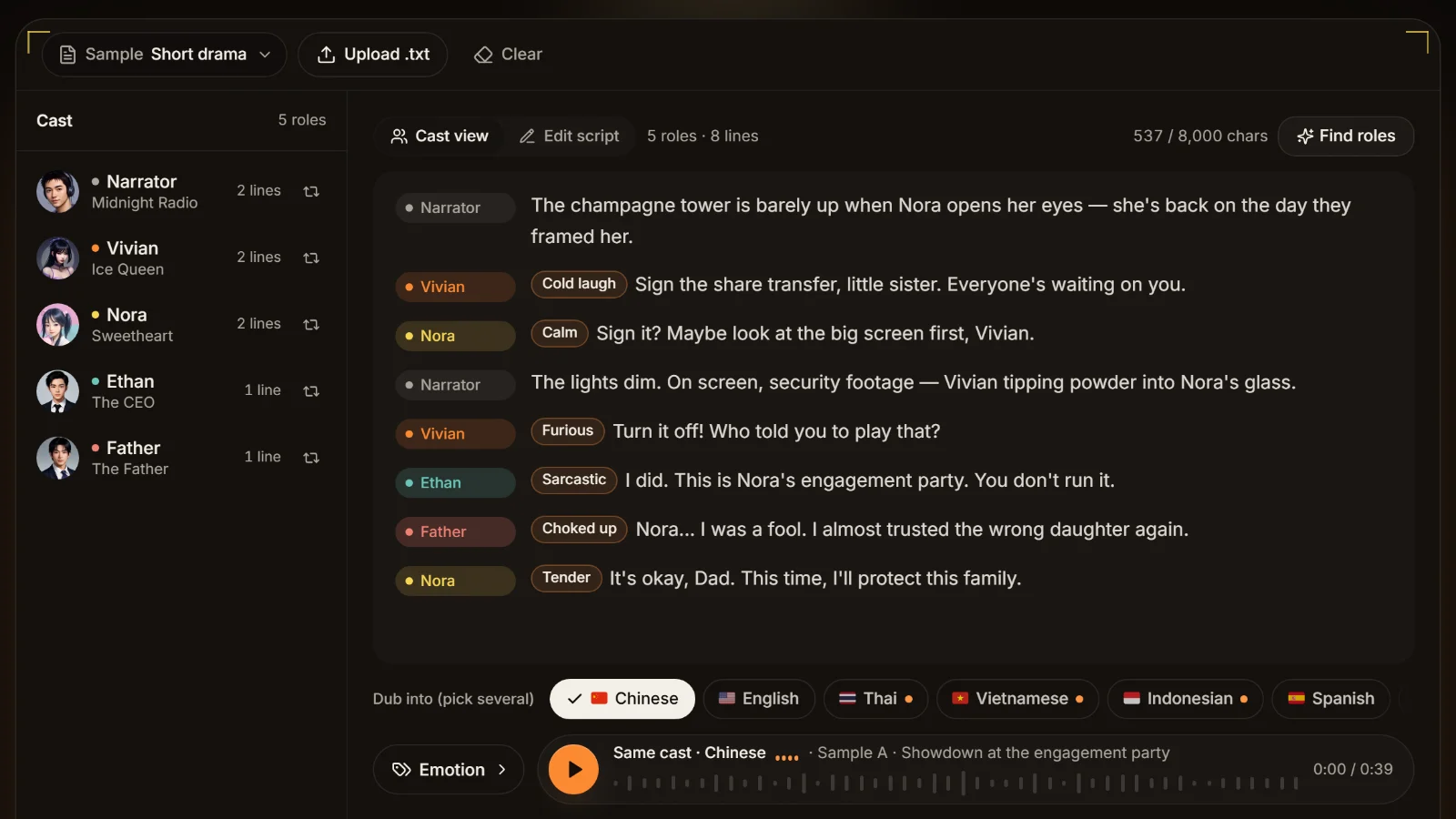
Neither site says it can detect characters from a script. In Jianying you pick a voice for each text segment yourself; in Moyin you use the multiple-speaker tool to assign speakers to sentences. With dozens of lines and five or six characters per episode, that takes real time. For scripts like these you can paste into AI Drama Voice, let it cast and voice the episode, then import it into Jianying; see the Jianying voiceover alternative.
Once the script is pasted and analyzed, who says each line is already settled: one voice per character in the cast list, and a speaker and emotion on every line.Product screenshot
Foreign versions
Jianying's Chinese edition doesn't disclose its reading languages (CapCut international lists Vietnamese, Thai, English, Spanish, Japanese and others). Moyin publishes Japanese, Korean, German, Russian and French; Thai, Vietnamese and Indonesian are not disclosed. Both work on the basis of you supplying the translation. To translate a Chinese script line by line into local speech and keep the Chinese cast's voices, see multilingual dubbing.
00:02:12,400Using both
Can Moyin voiceovers be imported into Jianying?
Yes, and it is a common pairing. Moyin's member benefits include unlimited audio downloads and downloading the SRT that matches the voiceover. Drag the audio onto a Jianying audio track and import the SRT as local subtitles, and the subtitle timing lines up with the voice.
1.Voice and preview in Moyin; check polyphonic characters and pauses
2.Download the audio and SRT
3.Import audio and local subtitles in Jianying and line them up with the picture
4.Denoise, even out loudness and add music in Jianying, then export
A third option, briefly
If your script has many characters and you also need Thai, Vietnamese or Indonesian versions, AI Drama Voice can do the casting, voicing and one SRT per language, which you then import into Jianying the same way. It has neither Moyin's word-level tuning nor Jianying's editing; it only does that one step.
00:05:59,200Before you choose
Settle Jianying vs Moyin with one test passage
Testing your own script in both beats any review. Five things worth checking while you test.
Include polyphonic words
Put in words like 行长, 重来 and 长大 on purpose and see which tool reads them right and how easy a wrong reading is to fix. See fixing polyphonic characters.
Include a twist that needs a pause
Something like "I thought you'd come… but you didn't"; listen for a natural pause and whether you can adjust it.
Watch the member labels on voices
Neither site publishes a feature-by-feature price list, so note whether the voices you pick need a membership or a separate purchase.
Confirm export and commercial use
Neither public site fully states audio formats or commercial rights. For commercial work read the user agreement; see the commercial use guide.
Time the multi-character work
For a multi-character drama, note how long it takes to voice every role in one episode. That number often says more than the membership fee.
00:05:39,300Sources
Sources and trademark note
Everything here was checked on 5 November 2026. Jianying features come from the capcut.cn and jianying.com homepages; the site publishes no membership price page or reading languages. CapCut international languages come from its text-to-speech tool page on capcut.com. Moyin features come from its official site; voice counts, languages, dialects, member benefits and prices from its App Store listing (written by the developer, not the official site). More at AI voiceover tools compared and Hailuo vs Jianying.
Trademark note
Jianying (剪映), CapCut and Moyin (魔音工坊) are trademarks of their respective owners. They are mentioned only to describe and compare; AI Drama Voice is not affiliated with or endorsed by any of them.
00:02:28,100FAQ
Frequently asked questions
For voicing while you edit and single-voice narration, Jianying, because voice and edit share one project. For pronunciation-critical work with polyphonic characters and pauses to tune, Moyin. Many people use both: voice in Moyin, edit in Jianying.
Jianying's site says popular voices or voice cloning, with no published count. Moyin's App Store description cites 800+ voices and 1,000+ styles, plus dialects and individually paid voices. Whether they sound good is personal; compare the same passage blind.
Yes. Moyin members can download audio without limit and download the matching SRT. Drag the audio onto a Jianying track and import the SRT as local subtitles. Syncing tips in syncing in Jianying.
Moyin's site explicitly lists polyphonic characters, pauses, stress and local speed among its tuning tools. Jianying's public site doesn't describe word-level tuning like this (not disclosed, checked 2026-11).
For single-narrator recaps, either. For multi-character dramas the question is automatic casting, which neither site discloses, so you assign voices segment by segment or sentence by sentence. To cast a pasted script automatically and add foreign versions, try AI Drama Voice, then import into Jianying.