Subtitle Format Converter: SRT, VTT, ASS and LRC
This subtitle format converter needs no install: drop in an SRT, VTT, ASS or LRC file, and it detects the format from the content (not the file extension), lets you pick a target, and rewrites every timecode the way that format expects. Drop several files at once and they come back in one ZIP. It also tells you plainly what a conversion loses: ASS to SRT drops styles and positions, VTT cue settings are discarded on the way to SRT, and LRC has no end times, so each one is taken from the next line. Files are processed in your browser and never uploaded.
- SRT · VTT · ASS · LRC
- Detects format by content
- Batch to ZIP
- Nothing uploaded
Updated Nov 5, 2026Fact-checked Nov 5, 2026
episode-01.en.srt
UTF-81
00:00:00,400 --> 00:00:06,900
The champagne tower is barely up when Nora opens her eyes — she's back on the day they framed her.
2
00:00:07,100 --> 00:00:11,800
Sign the share transfer, little sister. Everyone's waiting on you.
3
00:00:12,000 --> 00:00:15,700
Sign it? Maybe look at the big screen first, Vivian.
4
00:00:15,900 --> 00:00:22,000
The lights dim. On screen, security footage — Vivian tipping powder into Nora's glass.
5
00:00:22,200 --> 00:00:25,000
Turn it off! Who told you to play that?
Subtitle format converter: drop files, pick a format
Convert between SRT, VTT, ASS and LRC in any direction, several files at a time. Downloads are UTF-8 without a BOM by default; tick "Add BOM" and "CRLF line endings" for older Windows software.
How to use the subtitle format converter
One file or a whole folder works the same way. On your first go, convert a single file and read the notes before running a batch.
- 01
Drop in your subtitle files
Drag .srt, .vtt, .ass or .lrc files onto the tool, or click to pick them; you can select several at once. Detection reads the content, not the extension, so an SRT that was renamed to .txt is still recognised.
Tip · If Chinese or other non-Latin text already shows as gibberish, run it through the garbled subtitle fixer first to get UTF-8.
- 02
Pick the target format
Choose SRT, VTT, ASS or LRC. Every timecode is rewritten for the target: commas become periods, milliseconds become hundredths of a second, or only the start time is kept.
- 03
Read the notes and decide on bold and italics
When the source is ASS and the target is SRT or VTT, bold, italic and underline can be kept as <b> <i> <u>; position and colour effects are removed. Anything the conversion drops (styles, positions, cue settings) and anything it has to fill in (LRC end times) is listed in the notes.
- 04
Download
A single file downloads directly; several come back as one ZIP. The default is UTF-8 without a BOM and LF line endings. If an older Windows program misreads the file, tick "Add BOM" and "CRLF line endings" and download again.
One subtitle, written four ways
Before you convert, it helps to see what actually differs. All four formats record "show this text from here to there"; they differ in how the time is written and whether styling and position come along.
| Format | What the file says (↵ = new line) | Precision | Styling and position |
|---|---|---|---|
| SRT | 12 ↵ 00:01:02,500 --> 00:01:05,200 ↵ Three years of debts. Tonight I collect. | Milliseconds | Barely any; some players read <i> and similar tags |
| VTT | WEBVTT ↵ ↵ 00:01:02.500 --> 00:01:05.200 line:85% ↵ Three years of debts. Tonight I collect. | Milliseconds | Cue settings set position and alignment |
| ASS | Dialogue: 0,0:01:02.50,0:01:05.20,Default,,0,0,0,,{\b1}Three years of debts.{\b0} Tonight I collect. | Hundredths | Full: font, colour, outline, position, animation |
| LRC | [01:02.50]Three years of debts. Tonight I collect. | Hundredths | None, and no end time |
SRT: supported everywhere, styled almost nowhere
Each SRT cue is an index, a timecode, the text and a blank line, and practically every editor, player and video platform reads it. The price is that SRT leaves styling to whatever plays it: font, size and position are not part of the file. For every field's rules and the usual mistakes, see the SRT file format explained.
VTT: the format web players use
WebVTT is the caption format of the HTML5 <track> element. It looks a lot like SRT with three differences: the first line must read WEBVTT, milliseconds follow a period, and a timecode can carry cue settings (line, position, align) that place the text on screen. VTT also allows NOTE comment blocks, and cue numbers are optional.
ASS: the fansub and styled-subtitle format
ASS (Advanced SubStation Alpha) keeps styles in a separate [V4+ Styles] section, and each Dialogue line names the style it uses. Inside the text, override tags like {\pos(x,y)} or {\fad} move and fade lines, and \N forces a line break. Time is kept to a hundredth of a second, written 0:01:02.50 with a one-digit hour.
LRC: a lyrics format at heart
Each LRC line has a single start time, [minutes:seconds.hundredths], and a line ends when the next one appears. That suits scrolling lyrics, and some players and audio apps use it for spoken lines too. With no end times in the file, any conversion out of LRC has to work them out.
What each conversion keeps and what it loses
Subtitle conversion is not lossless. Going to a simpler format throws the extra information away; going to a richer one fills the gaps with defaults.
| Direction | Lost | Filled in or rewritten |
|---|---|---|
| ASS → SRT | All styling: font, colour, outline, position, animation | \N becomes a real line break; bold, italic and underline can be kept as <b> <i> <u> |
| VTT → SRT | Cue settings (line, position, align), with a warning | Cue numbers added, periods turned into commas; VTT tags such as <c> and <v> removed |
| SRT → VTT | Practically nothing | WEBVTT header added, commas turned into periods |
| SRT → ASS | No text or timing | One default style (white text, black outline, bottom centre; Microsoft YaHei for Chinese); <i> <b> <u> become ASS tags; times rounded to hundredths |
| LRC → SRT / VTT | No text | Each end time taken from the next line's start; the last one estimated from its length |
| SRT / VTT → LRC | Multi-line cues joined into one line, tags removed | Each cue gets its start time; where there is a pause before the next line, an empty timestamp marks where the previous one ends |
A conversion can't invent what was never there
SRT to ASS gives you one uniform default style. Fansub-style typography, layered bilingual lines and repositioned text still have to be built in a subtitle editor such as Aegisub. And once ASS has gone through SRT, converting back will not restore the original styles, so keep the original ASS file.
ASS to SRT: what happens to the effect tags
Position and colour tags such as {\an8}, {\pos(x,y)} and {\c&H00FFFF&} have no equivalent in SRT or VTT, so the conversion removes them rather than leaving them in the line as stray characters. Bold, italic and underline can be kept as <b> <i> <u>; if you're not sure the player understands those, leave them out. One more thing: Dialogue lines in an ASS file are often out of time order, so on the way to another format the cues are re-sorted by start time.
Which format your dubbing SRT needs, and where
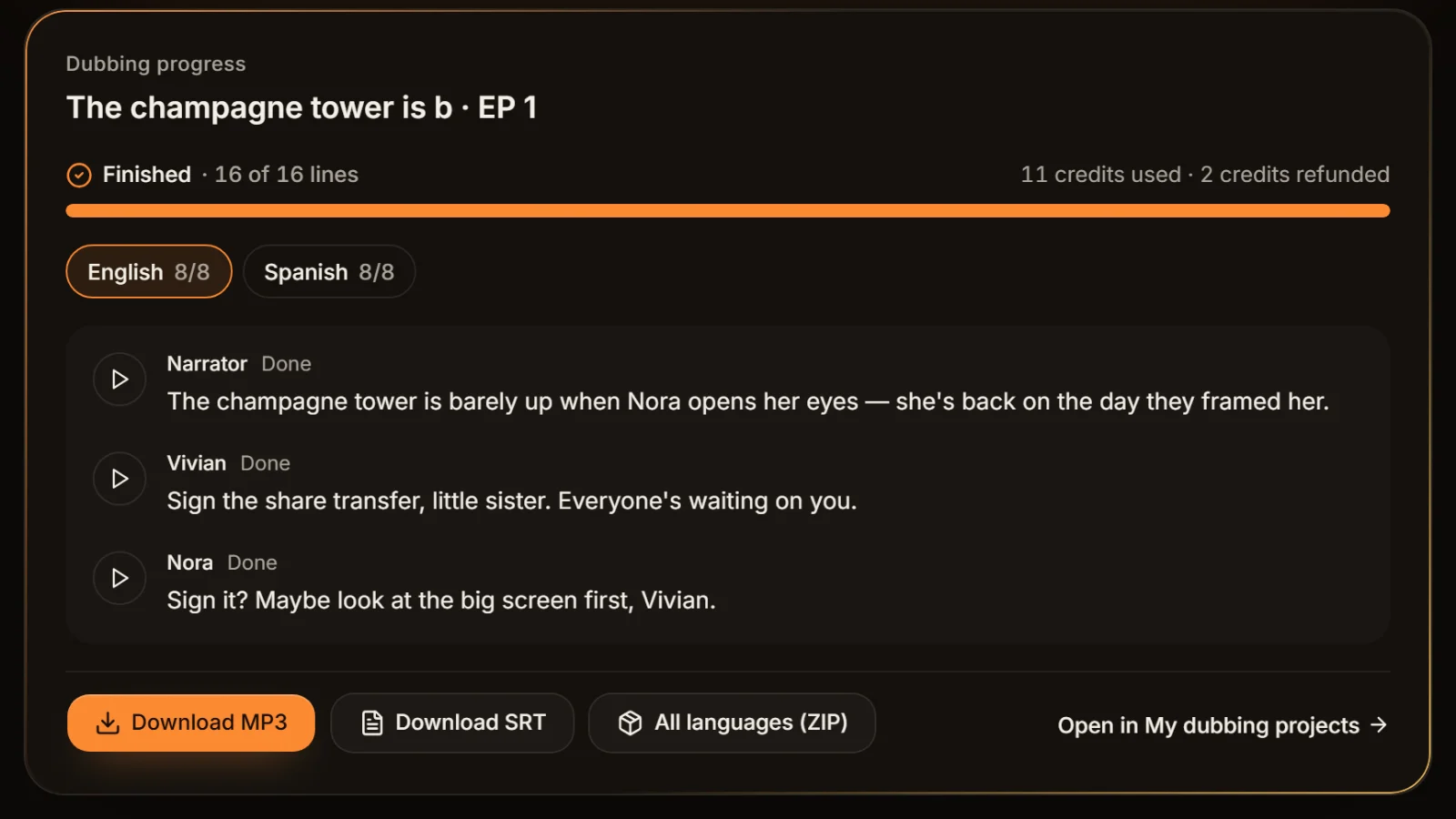
When you dub a script in AI Drama Voice, every language comes with its own SRT: one cue per line, each timed to where that line actually sits in the MP3, saved as UTF-8 with a BOM. Most of the time you can use it as is; these are the cases where the subtitle format converter helps.
| Where it's going | Format | What to do |
|---|---|---|
| CapCut or Jianying, for a vertical cut | SRT | Import as is; see the CapCut sync guide |
| YouTube captions | SRT or VTT | Upload the SRT; convert to VTT if you need to control position (see YouTube Help) |
| Your own site's HTML5 player | VTT | Convert SRT to VTT and point a <track> element at it |
| Fansub-style burn-in with styling | ASS | Convert SRT to ASS, then style it in a subtitle editor |
A script dubbed into several languages gives one subtitle file per language in the ZIP, named like "title.en.srt" and "title.th.srt". Unzip them and drop the whole set into the converter above to get every language as VTT in one pass; the language code in each file name keeps them apart.
No SRT yet?
With only a script, TXT to SRT builds a first draft timed by speaking rate. For subtitles that line up with the voice line by line, dub the script in the workshop; the export includes the SRT.
Five checks before and after you convert
The right format doesn't guarantee usable subtitles. A minute spent on these before and after the subtitle format converter saves the hunt for why an import failed.
Check the encoding first
If the source text is already garbled, the converted file will be too. Turn it into UTF-8 with the garbled subtitle fixer before converting.
Fix timing before format
If every cue is early or late, shift it with SRT time shift first. A format conversion won't repair timing along the way.
Merge bilingual lines, then convert
For dual-language subtitles, build one file with the bilingual subtitle merger and convert that. Doing it the other way round makes alignment harder.
Check line length for vertical video
ASS and VTT can move a line, but they can't decide how much text fits on it. Run vertical-drama subtitles through the subtitle line length checker before or after converting.
Spot-check the start, middle and end
Open the result in a player or editor and look at the first cue, one in the middle and the last. For files that came from LRC, check the last cue's end time in particular.
Frequently asked questions
Drop the .vtt file into the subtitle format converter on this page, choose SRT and download. The tool removes the WEBVTT header, numbers every cue and swaps the period before the milliseconds for a comma. VTT cue settings that control position have no SRT equivalent, so they are dropped and flagged.
Yes. SRT stores no fonts, colours, outlines or positions, so an ASS file converted to SRT keeps only timing and text, and \N becomes an ordinary line break. Effect tags like {\an8} are removed; bold, italic and underline can be kept as <b> <i> <u>. Keep the original ASS file separately.
They are close cousins. A VTT file must begin with WEBVTT, writes milliseconds after a period (00:00:01.500), may skip cue numbers and can add cue settings for position. SRT uses a comma (00:00:01,500), numbers every cue and carries almost no styling. HTML5 web players use VTT; video editors generally take SRT.
SRT is the simplest. YouTube's help page (checked 2026-11) lists SRT, SBV, VTT and LRC among others; SRT must be basic, plain UTF-8, with no styling, while VTT supports positioning. ASS is not on the list, so convert it to SRT or VTT first.
Yes. Drop several files at once, pick the target format, and the converter processes each one and returns a single ZIP. The sources can be a mix of formats, since each file is detected from its own content.
Yes. LRC lines only have start times, so in the SRT each line ends where the next begins, and the last line, with nothing after it, gets a length estimated from its text. Play the last line once afterwards and adjust its end time by hand if needed.








Subtitles and dubbing, in one go One script, every format.
Paste an episode and AI casts and voices every line; each language exports an MP3 and a matching SRT you can convert for any platform. Cast analysis is free.
Billed by characters generated · Failed runs refunded automatically · Alipay, WeChat Pay and cards