TXT Splitter: Cut a Novel by Chapter or by Length
This TXT splitter turns one big novel file into a set of small ones. It can cut at chapter headings such as "Chapter 12" or 第十二章, or into chunks of a length you choose, and it only ever breaks at the end of a sentence. The dubbing workshop's episode limit is built in: 8,000 characters (whitespace not counted) and 400 lines. In "chapters, merged" mode, neighbouring short chapters are joined into one file under the limit, an over-long chapter is split at a sentence end, and every file shows its character and line count. Old TXT files in GBK or Big5 are detected automatically, every output file is saved as UTF-8, and the set downloads as one ZIP. It all runs in your browser; the file is never uploaded.
- By chapter or length
- 8,000-char episodes
- GBK detected
- Nothing uploaded
Updated Nov 6, 2026Fact-checked Nov 6, 2026
Sample C · Poisoned wine in the cold palace
English · Script excerpt · 3 characters


Narrator
Chapter One — Snow in the Cold Palace
Narrator
In the winter of the twelfth year of Yong'an, when the first snow fell on the Cold Palace, Shen Zhiwei had lived there for three full years.
Narrator
The gate swung open. Wrapped in white fox fur stood Consort Liu, the emperor's favorite.

Consort LiuCold laugh
Still so proud, sister. I'm with child — I've come to share a cup of celebration wine.
TXT splitter: open a novel, check the chapters, then cut
Pick a TXT (up to 50 MB) and a split mode. The tool lists the chapter headings it found so you can check them, shows the character and line count of every part, flags parts over 400 lines in red, and downloads everything as a ZIP.
How to use the TXT splitter in four steps
No software to install and no regex knowledge needed. On your first run, try a book you know well, so you can tell at a glance whether the chapter list is right.
- 01
Open a TXT or paste the text
Choose a .txt file of up to 50 MB, or paste the text straight in. The encoding is detected for you: UTF-8, GBK and Big5 all work. If the preview shows normal text, the file was read correctly; if the tool isn't sure, it tells you.
Tip · Still seeing garbled characters? The file uses a rarer encoding. Save it as UTF-8 in a text editor first, then open it again.
- 02
Pick a split mode
"Chapters, merged" is the default: it cuts by chapter, then joins neighbouring short chapters up to the limit, which starts at the workshop's 8,000 characters with the 400-line limit kept as well. The other two: "By chapter" gives one file per chapter, with an option to split chapters over the size limit at sentence ends; "By length" makes each file close to the size you set, breaking at a paragraph end where it can and otherwise at a sentence end.
- 03
Check the chapter headings it found
Before anything is cut, the tool lists every heading it recognised, each with a tick box: untick false hits, and for missing ones tick another preset or write a custom regex. Numbers that skip (Chapter 12 followed by Chapter 14) and headings with no text under them (a table of contents, a volume title) are marked, and the empty ones can be unticked in one click. If no heading is found at all, the tool falls back to splitting by length.
- 04
Read the sizes, download the ZIP
The results table shows each part's characters (whitespace not counted, the same count the workshop uses) and lines, with anything over 400 lines in red. Copy or download any part on its own, or download the whole set as a ZIP: every file is UTF-8 and named "number-chapter title.txt", for example "001-Chapter 1.txt", so the number doubles as the episode number.
Why the TXT splitter defaults to 8,000 characters
The number is not arbitrary: it is exactly what one episode in the AI Drama Voice dubbing workshop holds. One part from the splitter pastes straight in as one episode.
The workshop's two limits
The first is 8,000 characters. The workshop counts characters with every space and line break removed, punctuation included, and it refuses a .txt upload over 8,000. For English prose that works out to very roughly 1,500 words. The second limit is 400 lines: the workshop voices one line per row, and dialogue-heavy chapters gain rows faster than characters. Do the sum: 400 lines of 20 characters is exactly 8,000, so a chapter whose lines average under 20 characters hits the line limit first. That is why the results table shows both numbers and marks any part over 400 lines in red.
One book, three ways to cut it
Say the first five chapters are 3,100, 2,800, 4,600, 2,400 and 9,300 characters long, 22,200 in total. The three modes give very different results:
| Mode | Parts you get | Problem or benefit |
|---|---|---|
| By chapter | 5 parts, one per chapter | Chapter 5 is 9,300 characters, over the episode limit; the other four are short, so the episodes come out uneven |
| By length (8,000) | 3 parts: two of nearly 8,000 each, then the rest | Every part is full, but the cuts usually land mid-chapter, so parts 2 and 3 each start halfway through a chapter |
| Chapters, merged (8,000) | 4 parts: chapters 1–2 (5,900); chapters 3–4 (7,000); chapter 5 split into two pieces of about equal size | Every episode starts at a chapter opening and none is over the limit, so one part is one episode |
Split text into chunks without cutting a sentence
In "by length" mode the TXT splitter never cuts at the exact character count. As a part fills up, it first looks back for a paragraph end; if breaking there still keeps the part at least 85% full, that is where it breaks. Otherwise it breaks at the nearest sentence end (a full stop, question mark, exclamation mark or ellipsis, with any closing quote kept on the sentence it closes; "Mr." and "Dr." don't count). Each part is therefore a little under the size you set, but no sentence is split across two files. The one exception is a single sentence longer than the limit, which can only be cut at a comma or semicolon; that part is flagged. For dubbing this matters: a line cut in half lands in two episodes, and neither the end of one nor the start of the next makes sense when read aloud.
Encoding, file size and file names
Many older Chinese TXT files are saved in GBK, and they turn into garbled characters in apps that expect UTF-8. The splitter decides between UTF-8, GBK and Big5 when it reads the file and always writes UTF-8, which CapCut, the workshop and e-readers open without trouble. The 50 MB limit is about 25 million Chinese characters in GBK (2 bytes each) or about 17 million in UTF-8 (3 bytes each); in plain English text it is around 50 million characters. Output files are named "number-chapter title.txt" with at least three digits (001, 002 …); merged chapters read "Chapter 1 ~ Chapter 2", and characters Windows doesn't allow in file names become spaces. Sorting the folder by name gives you reading order.
Split a novel into chapters: getting the headings right
A chapter splitter is only as good as its heading detection. The presets cover the common styles; a custom regular expression handles the rest. Whatever the rule, only a line that looks like a heading counts: at most 40 characters, no full stop or semicolon, at most one comma.
| Heading style | Example | Which rule |
|---|---|---|
| 第X章 with Chinese numerals | 第一百零八章 雪夜 | Preset |
| 第X章 with Arabic numerals | 第108章 雪夜 | Preset |
| 第X回, 第X卷, 卷X | 第十二回, 第二卷, 卷二 | Preset |
| 第X节 | 第3节 | Preset, off by default: many books divide chapters into sections, and cutting there is too fine |
| 序章, 楔子, 番外 | 楔子, 番外 雪夜重逢 | Preset |
| English chapters | Chapter 12, Chapter XII, Chapter Twelve | Preset |
| Prologue and epilogue | Prologue, Epilogue | Custom regex |
| Bare numbers | 108. Snow Night | Custom regex |
Custom regex: three examples to adapt
- Prologue, epilogue and interludes: (Prologue|Epilogue|Interlude)\b
- Bare numbered headings ("108. Snow Night"): \d+\.\s*\S+
- Named parts ("Part One", "Part Two"): Part\s+[A-Za-z]+
No need to start the pattern with ^: a custom rule only ever matches at the start of a line, and it ignores letter case. A sentence such as "she turned to chapter three." is neither at the start of a line nor free of a full stop, so it is never taken for a heading. Once the rule is written, glance at the list of headings the tool found: if the count matches the table of contents, go ahead and split.
The chapter heading gets read aloud
The first line of each part is usually its chapter heading. Paste it into the workshop and that line is voiced as narration. Keep it if you want the narrator to announce the chapter; delete it before dubbing if you don't.
What to do with the files the TXT splitter gives you
Splitting is only step one. Pick the path that matches your job.
One part, one episode
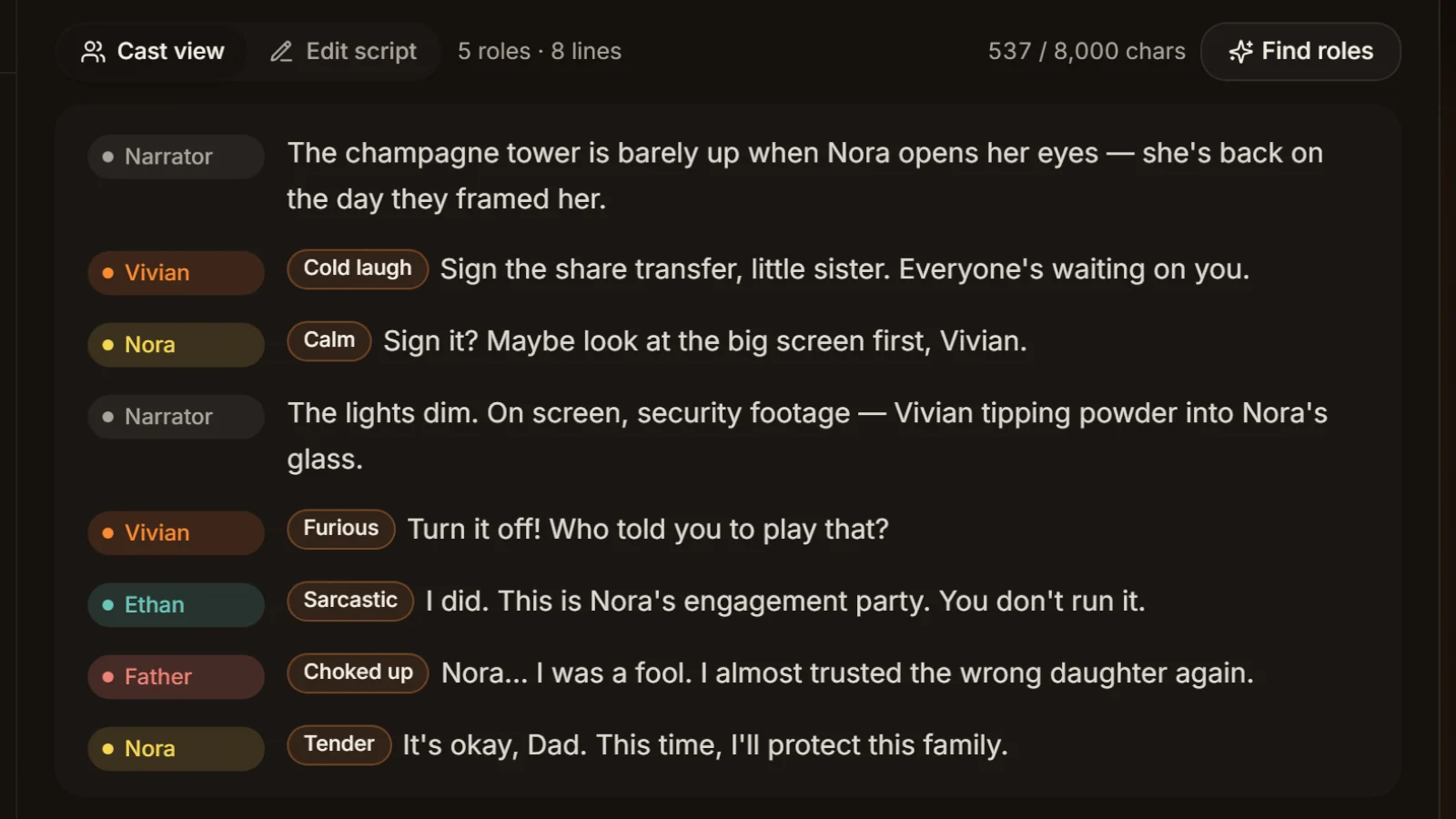
Paste a part into the dubbing workshop or use TXT to MP3 and it becomes one episode: narrator and characters voiced separately, exported as MP3 and SRT. Cast analysis is free, so you can check the roles before you generate.
Turn dialogue into script lines first
The workshop assigns roles only from "Name: line" rows; quoted dialogue in novel prose all goes to the narrator. Run the text through the novel dialogue extractor to get "Name (emotion): line" rows, then dub.
Hand chapters to different people
For proofreading, edits or outsourced voice work, send the book out one numbered file at a time and nothing gets mixed up on the way back. To see how many lines each character has first, use the script line counter.
Five habits for splitting a novel into episodes
Do these before you cut and you avoid most of the rework at dubbing time.
Delete the front matter first
Downloaded TXT files often open with the title, author, a blurb and a "formatted by" credit. Everything before the first chapter heading becomes part 001 on its own, and the narrator would read it. Delete it before splitting, or simply drop that file afterwards.
Leave headroom if you'll convert dialogue
After the novel dialogue extractor adds a name, a colon and sometimes an emotion to each spoken line, the text gets longer. If you plan to convert, split at around 7,000 characters so the result still fits.
Watch the line count in talky books
A part flagged red usually means very short dialogue lines that hit the line limit first. Check that the 400-line limit is switched on (it is by default) and split again; every part then stays within both the character and the line limit.
Let the number be the episode
Paste the parts into the workshop in file-number order and put the episode number in the project name. In My dubbing projects you can then tell at a glance which episode is which.
New book, new check
Every site formats its TXT files differently, so one rule doesn't fit every book. Each time, compare the number of headings found with the table of contents before you split.
Frequently asked questions
Open the file in the TXT splitter on this page and choose "By chapter". It finds headings with its presets (第X章 / 回 / 卷, 序章, 楔子, 番外, "Chapter N"; tick 第X节 yourself if you need it), lists them for you to check, then saves one file per chapter in a ZIP. For dubbing, choose "Chapters, merged" so short chapters are joined up to 8,000 characters.
Look at how the headings are written. "Prologue", "Part One" or bare numbers ("108.") are outside the presets; one line of custom regex fixes that, and the chapter-rules section above has examples to adapt. A heading line over 40 characters or with a full stop isn't taken as a heading either. If no heading is found at all, the tool falls back to splitting by length.
Normally no. When you split text into chunks by length, the TXT splitter breaks at a paragraph end where it can, otherwise at a full stop, question mark, exclamation mark or ellipsis, so each part runs slightly under the size you set. Only a single sentence longer than the limit is cut at a comma, and that part is flagged. In merged mode, an over-long chapter is split at sentence ends too.
The AI Drama Voice dubbing workshop takes up to 8,000 characters per episode (spaces and line breaks not counted, punctuation counted) and 400 lines. The TXT splitter uses that limit by default and shows both numbers per part, with anything over 400 lines in red. For what an episode costs, see pricing.
The TXT splitter detects UTF-8, GBK and Big5 on its own, which covers most old Chinese TXT files, and every file it writes is UTF-8. If the preview is still garbled, the file uses a rarer encoding: save it as UTF-8 in a text editor, then open it again. For garbled subtitle files, use the subtitle encoding fixer.
Up to 50 MB per TXT, roughly 25 million Chinese characters in GBK or 17 million in UTF-8, which is plenty for a long novel. The work happens on your own computer, so bigger files simply take longer.
No. The TXT splitter reads, splits and zips the file inside your browser. Nothing leaves your computer, no AI is involved and you don't need an account.





Split? Dub one part per episode One file, one episode.
Paste a part into the dubbing workshop: narrator and roles voiced separately, emotion on every line, MP3 and SRT out. Cast analysis is free.
Billed by characters generated · Failed runs refunded automatically · Alipay, WeChat Pay and cards