Extract Dialogue From a Novel Into “Name: Line” Script Format
This tool lets you extract dialogue from a novel and lay it out the way a dubbing script needs it: every quoted line on its own row with the speaker's name in front, and the narration on separate rows. Speakers and emotions are read from speech tags such as "Vivian sneered" or "she whispered". That is rule matching, not an AI that understands the story: lines with no clue become "?:" for you to fill in, and anything guessed from "he", "she" or the surrounding text is highlighted for you to check. The result is "Name (emotion): line" text that pastes straight into the dubbing workshop. It runs in your browser; nothing is uploaded and no AI is involved.
- Quotes on their own rows
- Speakers from speech tags
- Unknowns marked "?"
- No upload · no AI
Updated Nov 6, 2026Fact-checked Nov 6, 2026
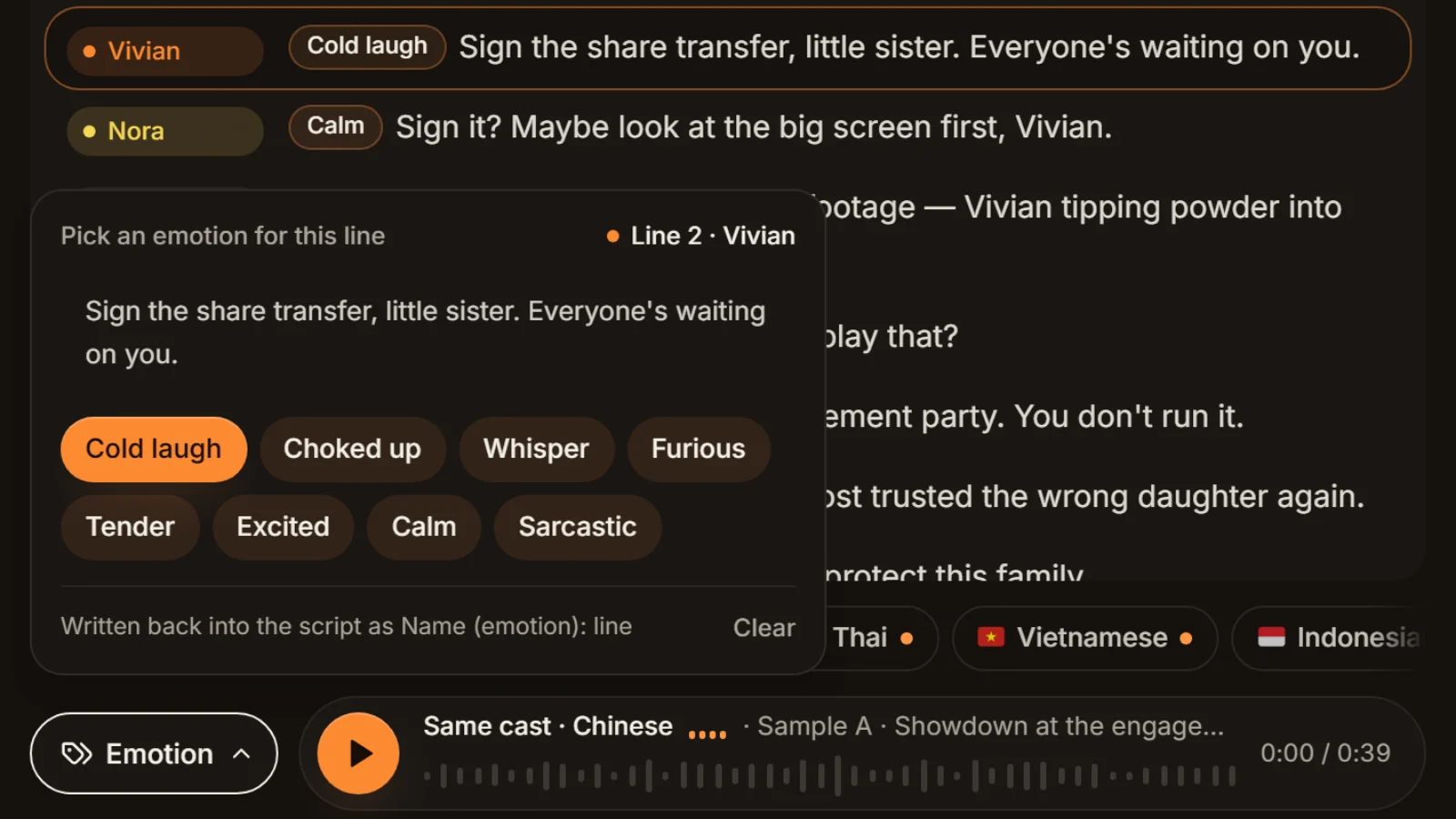
Sample A · Showdown at the engagement party
English · Script excerpt · 5 characters


Narrator
The champagne tower is barely up when Nora opens her eyes — she's back on the day they framed her.

VivianCold laugh
Sign the share transfer, little sister. Everyone's waiting on you.

NoraCalm
Sign it? Maybe look at the big screen first, Vivian.
Narrator
The lights dim. On screen, security footage — Vivian tipping powder into Nora's glass.
Paste a passage and watch it split
Paste or open a novel chapter (English or Chinese). The converted script and the cast table appear next to it. Rows marked "?:" need a speaker from you, highlighted rows are guesses: check both before you export.
How to extract dialogue from a novel in five steps
When you extract dialogue from a novel, one chapter at a time works best: the result is easy to check and fits the workshop's limit.
- 01
Step 1
Paste the text
Paste a chapter or open a TXT file, or load the sample first to see how it works. English and Chinese both work; the tool picks the rules from the text itself. One paragraph per line, with or without blank lines between them.
- 02
Step 2
Pick the quote marks and three switches
Straight quotes, curly double quotes and the Chinese 「」『』 are on by default; British-style single quotes ‘…’ have to be ticked. The switches: remove speech tags from the narration (on), guess "he" / "she" from the previous speaker (on), and keep narration rows (on; turn it off to get dialogue only).
- 03
Step 3
Fill in "?:" and check the highlights
"?:" marks a quote with no clue at all. Highlighted rows are guesses: from "he" or "she", from another quote in the same paragraph, or from a known character's action right after the quote. A highlight isn't necessarily wrong, but it always deserves a look. "?" rows and single wrong guesses are fixed row by row: copy the result out and edit it in a text editor, or paste it into the workshop and use Edit script.
Tip · The tool lists paragraphs whose quote never closes. Those are usually multi-paragraph speeches; check them separately.
- 04
Step 4
Rename and merge in the cast table
The cast table lists each character's line count and how many of those were guessed. Rename "Miss Nora" to "Nora" and the two become one role; fix a misread name here as well. Rename once and the whole script follows.
- 05
Step 5
Export and paste into the workshop
Hit Copy or download the TXT, then paste the converted text into the dubbing workshop. The workshop builds the cast from the "Name:" prefixes, gives each role a voice, and turns the bracketed emotions into emotion tags. Cast analysis is free, so you can check everything before you generate.
Novel to script format: how speakers are guessed
The extractor looks at three things only: the quote marks, the speech tag before or after a quote, and any mood word in that tag. Below is a ten-line passage we wrote, with the tool's actual output next to it.
| Original | Converted | Why |
|---|---|---|
| The champagne tower is barely up when Nora opens her eyes. | The champagne tower is barely up when Nora opens her eyes. | No quotes, so the whole paragraph is narration |
| "Sign the transfer, little sister," Vivian sneered. | Vivian (cold laugh): Sign the transfer, little sister. | Tag after the quote; "sneered" maps to the workshop's cold laugh |
| "Sign it?" Nora said calmly. "Maybe look at the big screen first." | Nora (calm): Sign it? / Nora: Maybe look at the big screen first. [highlighted] | The tag names Nora for the first quote; the second one, with narration between, follows it as a guess |
| The lights dim. On screen, Vivian is tipping powder into Nora's glass. | The lights dim. On screen, Vivian is tipping powder into Nora's glass. | Narration |
| "Turn it off!" Vivian shouted. "Who told you to play that?" | Vivian (furious): Turn it off! / Vivian: Who told you to play that? [highlighted] | "shouted" maps to furious; the second quote follows the first |
| Ethan stood up slowly. "I did." | Ethan stood up slowly. / ?: I did. | No speech verb, and Ethan never had a speech tag before, so the name isn't known yet |
| She choked back a sob. "Why would you help me?" | She choked back a sob. / ?: Why would you help me? | "choked back a sob" isn't a speech tag; left for you |
| "Because you deserve it," he said softly. | Vivian (whisper): Because you deserve it. [highlighted] | "he" goes to the previous speaker, Vivian: wrong, it was Ethan. Gender is never checked, hence the highlight |
| This time, Nora thought, nobody fools me again. | This time, Nora thought, nobody fools me again. | An unquoted thought stays narration |
| "Thank you," Nora whispered. | Nora (whisper): Thank you. | "whispered" maps to whisper |
Which speech tags it reads
- Tag after the quote: "…," Vivian sneered. / "…," said Lin Wan angrily.
- Tag before the quote: Then Nora said softly, "…" / She whispered: "…"
- Tag between two quotes: "Sign it?" Nora said calmly. "…" Both quotes go to Nora.
- Dozens of speech verbs (said, asked, replied, whispered, shouted, muttered, snapped, sneered, sighed, pleaded …), with an adverb before or after them.
- A quote with no tag in a paragraph where another quote has one, with narration between them: it follows that one, highlighted.
- In Chinese text, a known character's action straight after a quote ("林晚转身离开") is taken as the speaker, highlighted. English text gets no such guess.
How mood words map to emotions
| Workshop emotion | Words that trigger it (selection) |
|---|---|
| Cold laugh | sneer, scoff, smirk, coldly, icy |
| Choked up | sob, choked, crying, tearful, heartbroken |
| Whisper | whisper, softly, quietly, hushed |
| Furious | angrily, shout, yell, furious, enraged |
| Tender | tenderly, gently, lovingly, warmly |
| Excited | excitedly, thrilled, shocked, surprised, amazed |
| Calm | calmly, flat, steady, evenly, composed |
| Sarcastic | sarcastically, mocking, taunting, teasing, wry |
Matching is literal. Manner words that aren't on the list, such as "muttered" or "laughed", are written as a bracketed note: "Gu Cheng (muttered): Fine." The workshop never reads a note aloud; it passes it to the voice model as a delivery hint for that line. Only the eight emotions above show up as emotion tags you can change line by line in the workshop.
What the dialogue extractor doesn't handle
Rules can't settle the cases below. The tool doesn't pretend to: it leaves them as they are or flags them. Look for them once after every conversion.
Quotes inside quotes
Nora said, "He told me 'wait for me', and then?" The whole outer quote goes to Nora, and the inner 'wait for me' is not split off as someone else's line. For reported speech that is usually what you want, since Nora reads it all; if the inner quote should have its own voice, split it into two rows by hand.
Speeches that run over several paragraphs
The classic convention for a long speech opens a quote at the start of each paragraph and closes it only at the end of the last one. The tool works paragraph by paragraph, lists those paragraphs as "quote not closed", and the earlier ones usually come out as "?:". Fill them in with the same speaker when you check.
Unquoted thoughts and stray colons
"This time, Nora thought, nobody fools me again." has no quote marks, so it stays narration. Watch out for colons in narration, though: in the workshop, a row that starts with a word or two and a colon ("Note: the letter was gone") is read as a role called "Note". Rewrite such rows. If a thought should be voiced by the character, write it as "Nora (thinking): This time, nobody fools me again."; the bracketed note isn't read aloud.
"He", "she" and first person
"He" and "she" always go to the previous speaker, whoever that was, so a two-person exchange is easily flipped. In a first-person novel, "I said" makes the speaker "I", and a "he said" right after it is guessed as "I" too. Rename "I" to the narrator's name in the cast table, then go through the highlighted rows.
Misread names
A capitalised word in front of a name can be glued onto it: "Finally Nora said" comes out as a role called "Finally Nora". A compound action before the verb ("Lin Wan grinned and said") breaks the tag altogether and leaves "?:". Both show up at once in the cast table or as question marks; rename "Finally Nora" to "Nora" and it merges.
Rule-based extraction vs. AI novel-to-script tools
| This dialogue extractor | AI novel-to-script tools | |
|---|---|---|
| The original text | Not a word changed; only names, emotion brackets and line breaks added | Usually rewritten, cut and given scene directions |
| Who speaks | Read from speech tags; "?" when unknown, guesses highlighted | Decided by the model |
| Same text, second run | Exactly the same result | May differ |
| Where the text goes | Stays in your browser | Usually sent to a model service |

Convert a novel to a dialogue script the dubbing workshop can read
The AI Drama Voice dubbing workshop assigns roles only from "Name:" prefixes. Rows without a name all go to the narrator; it never guesses a speaker from "he said coldly". This tool fills exactly that gap.
The format the workshop reads
- One line per row.
- Dialogue as "Name: line" or "Name (emotion): line"; full-width and half-width colons and brackets both work.
- Narration as plain text with no prefix, or with "Narrator:" in front.
- A bracket holding one of the eight emotions (or a synonym) becomes an emotion tag; anything else in brackets is a delivery note and isn't read aloud.
The extractor's output is already in this format. For the fuller conventions (scene headings, action lines, voice-over marks), see the short-drama script format guide. To see how many lines each character has before you cast, paste the converted text into the script line counter.
Three checks before you paste
- 1.No "?:" left. The workshop doesn't accept "?" as a name, so the whole row goes to the narrator and is read in the narrator's voice.
- 2.One name per person. The workshop tells roles apart by name, so "Nora", "Miss Nora" and "Nor" would get three voices. Merge them in the cast table.
- 3.No more than 8,000 characters per run (whitespace not counted). The conversion adds a name, a colon and sometimes an emotion to every spoken line, so a chapter just under the limit can end up over it. Split it with the TXT splitter first, at a slightly lower limit.
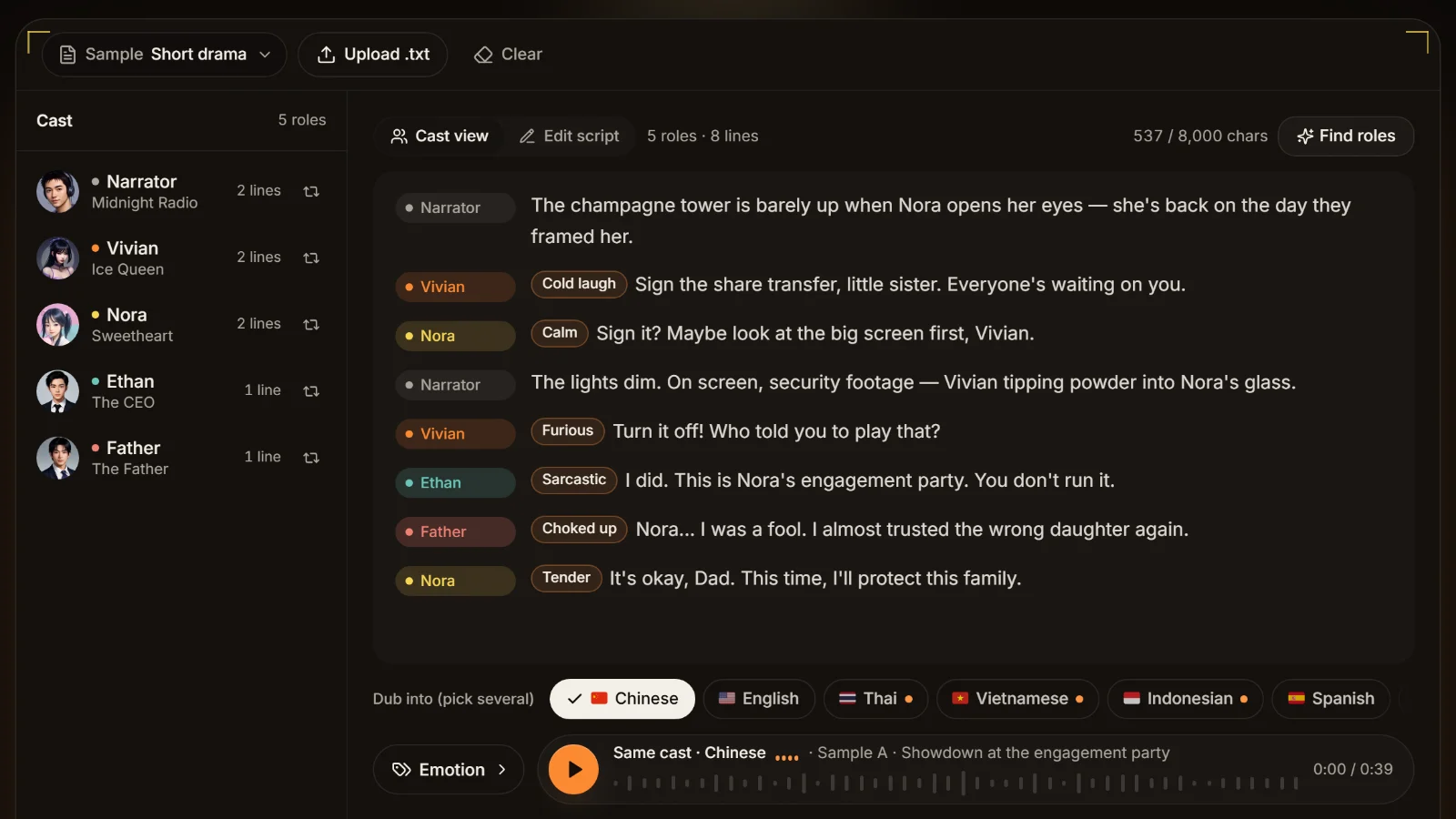
Once pasted, the workshop analyses the cast first: each role gets a voice you can swap, and each line's emotion can be changed. That step is free; generate when it sounds right. The same cast can then be dubbed into English, Thai, Vietnamese, Indonesian, Spanish, Portuguese, Japanese and Korean, with an MP3 and an SRT per episode and language. For working through a whole book chapter by chapter, see novel to audiobook.
Five small edits that make extraction more accurate
Tidy the source a little before you extract dialogue from a novel and you get far fewer "?" rows and highlights.
Settle the quote marks first
Some books use double quotes for dialogue and also for scare quotes (the so-called "rules"), which then get read as dialogue. Untick the style used for emphasis or change those marks. For British books that use ‘…’ for speech, tick single quotes.
Replace a few pronouns with names
Two characters of the same gender trading lines, all "he said", will confuse any rule. Put names in at a few key points and the guesses after them land correctly.
Give each main character one clean tag early
Names are collected from "X said"-style tags first. If a main character's first line has no tag at all, add one by hand, and later lines become easier to resolve.
Leave nicknames for the cast table
Don't edit nicknames and titles (Nor, Miss Nora, the young lady) in the source. Convert first, then merge them in the cast table in one go.
Split the book, then extract
A whole book in one paste is impossible to check. Cut it by chapter with the TXT splitter, then convert and paste one chapter at a time.
Frequently asked questions
A dubbing script is one line per row, dialogue as "Name: line" and narration with no prefix. To extract dialogue from a novel into that shape, paste a chapter into the tool on this page: quoted lines become "Name (emotion): line", narration gets its own rows. Fill in the "?:" rows, check the highlighted ones, and paste the result into the dubbing workshop.
It guesses, it doesn't understand. Speakers come from speech tags such as "Vivian sneered" or "she whispered"; "he" and "she" go to the previous speaker regardless of gender; quotes with no clue become "?:". Always check the result, the highlighted rows above all.
For a wrong name that repeats, rename it in the cast table and every line changes with it. The converted text inside the tool is read-only, so single wrong guesses and "?:" rows are fixed after you copy it out: in a text editor, or in the workshop's Edit script view once pasted.
Text inside quote marks is dialogue and everything outside is narration. By default the speech tags ("she said", "Vivian sneered") are removed from the narration and what remains gets its own rows; there are switches to keep the tags or to drop narration entirely. Unquoted thoughts stay in the narration.
Yes. Rename a character in the cast table and all of their lines change. Rename one to an existing name (Miss Nora → Nora) and the two roles merge. The exported script only contains the final names.
Yes. Chinese text is detected automatically and read with Chinese rules: 「」『』 and curly quotes, tags such as 冷笑道 or 低声说, and the same eight emotions written as 冷笑, 耳语 and so on. The output then reads "苏曼(冷笑):台词", which the workshop takes as well.
AI tools rewrite the text, add scenes and let a model decide who speaks. This extractor keeps every word of the original, adds names and emotions by rule, flags what it isn't sure of, gives the same result every time, and keeps the text in your browser. Use AI for an adaptation; use this to dub the book as written.




Script ready? Give every role a voice Every voice, from the page.
Paste the converted "Name (emotion): line" script into the dubbing workshop: one voice per role, emotion on every line, MP3 and SRT out. Cast analysis is free.
Billed by characters generated · Failed runs refunded automatically · Alipay, WeChat Pay and cards