
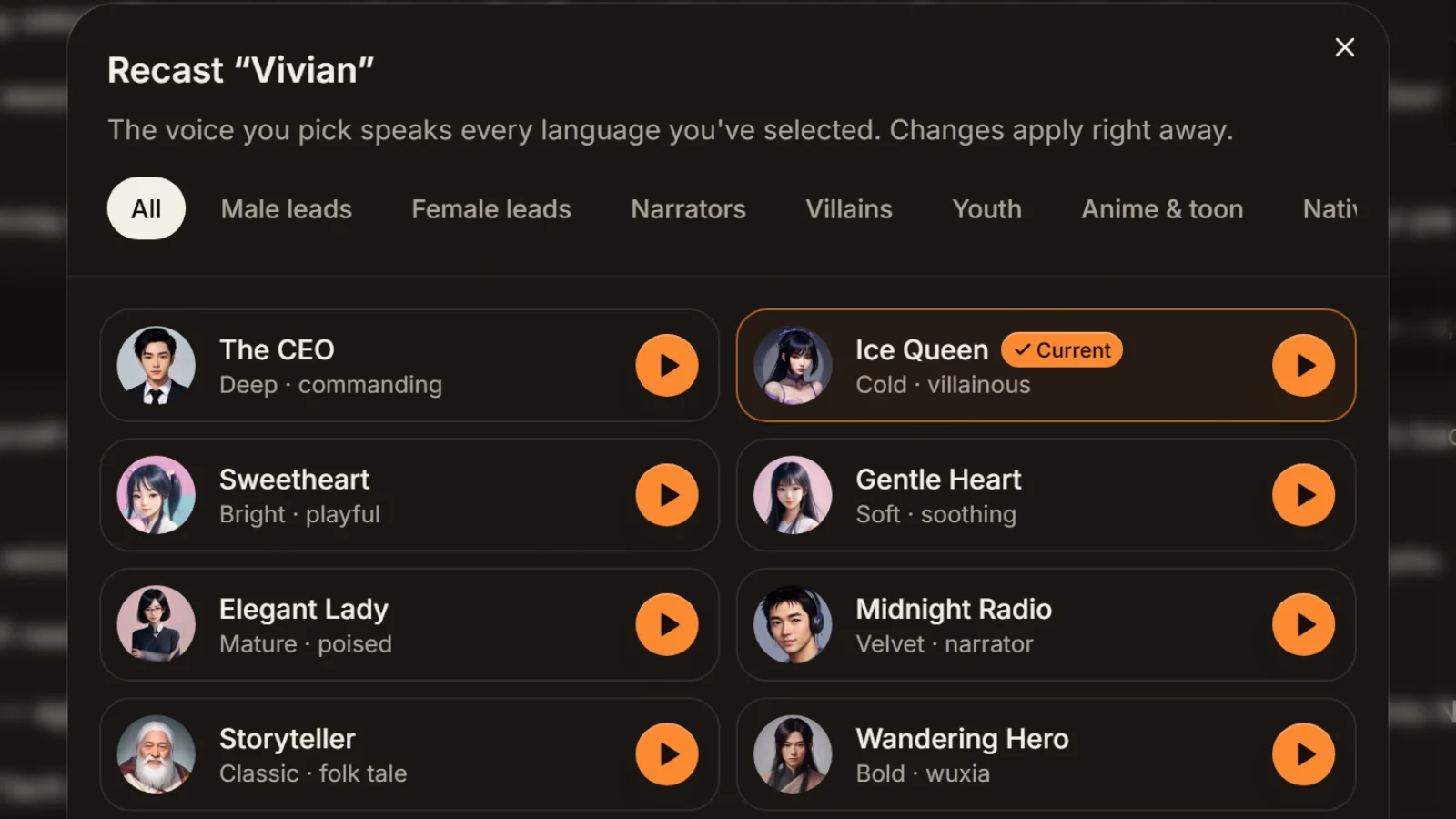
The CEO
Deep · commanding
● Couple · him
Deep and commanding; holds up in a fight or a confession.
Male leadsMale9 languages
Dialogue text to speech comes down to one thing: the tool has to know who says each line. In AI Drama Voice, write the conversation one line per row as “Name: line”; the studio splits out the speakers, gives each a different voice, and renders everything in order as one MP3 plus an SRT timed line by line. Any line can also carry an emotion such as cold laugh, whisper or choked up. Pick names the studio can read and male and female voices land right the first time; write A and B and the genders are assigned at random, so you swap them in the cast list. English and Chinese conversations both work.
Updated Nov 6, 2026Fact-checked Nov 6, 2026
Sample D · The CEO who falls asleep to her voice
Chinese · Script excerpt · 3 characters

旁白
我叫温以宁,一个凌晨给失眠的人读睡前故事的小主播。
旁白
签隐婚合约那天,顾总只提了一个条件——每晚十一点,准时开播。
顾总Calm
合约第七条,不见面,不打听我是谁。

温以宁Sarcastic
放心,顾总,我对你的钱比对你的人感兴趣。
The studio opens on a scene between two people, Yining and Mr. Gu, plus a narrator. Click Edit script, replace the narrator rows with your own “Name: line” dialogue, then Find roles to see who got a male voice and who got a female one — this costs no credits.
Dialogue text to speech goes through the same studio as a full drama, just with fewer people and more back-and-forth, so names and emotions matter more.
Start each line with the speaker's name and a colon, like “Ms Hart: Three years.” Put only one person's line on a row; never squeeze two speakers into one.
Tip · For an intro or a scene description, add a separate “Narrator: …” row and a third voice reads it.
Paste into the dubbing studio and click Find roles. The cast list shows each speaker with a line count and the voice they got. This step is free.
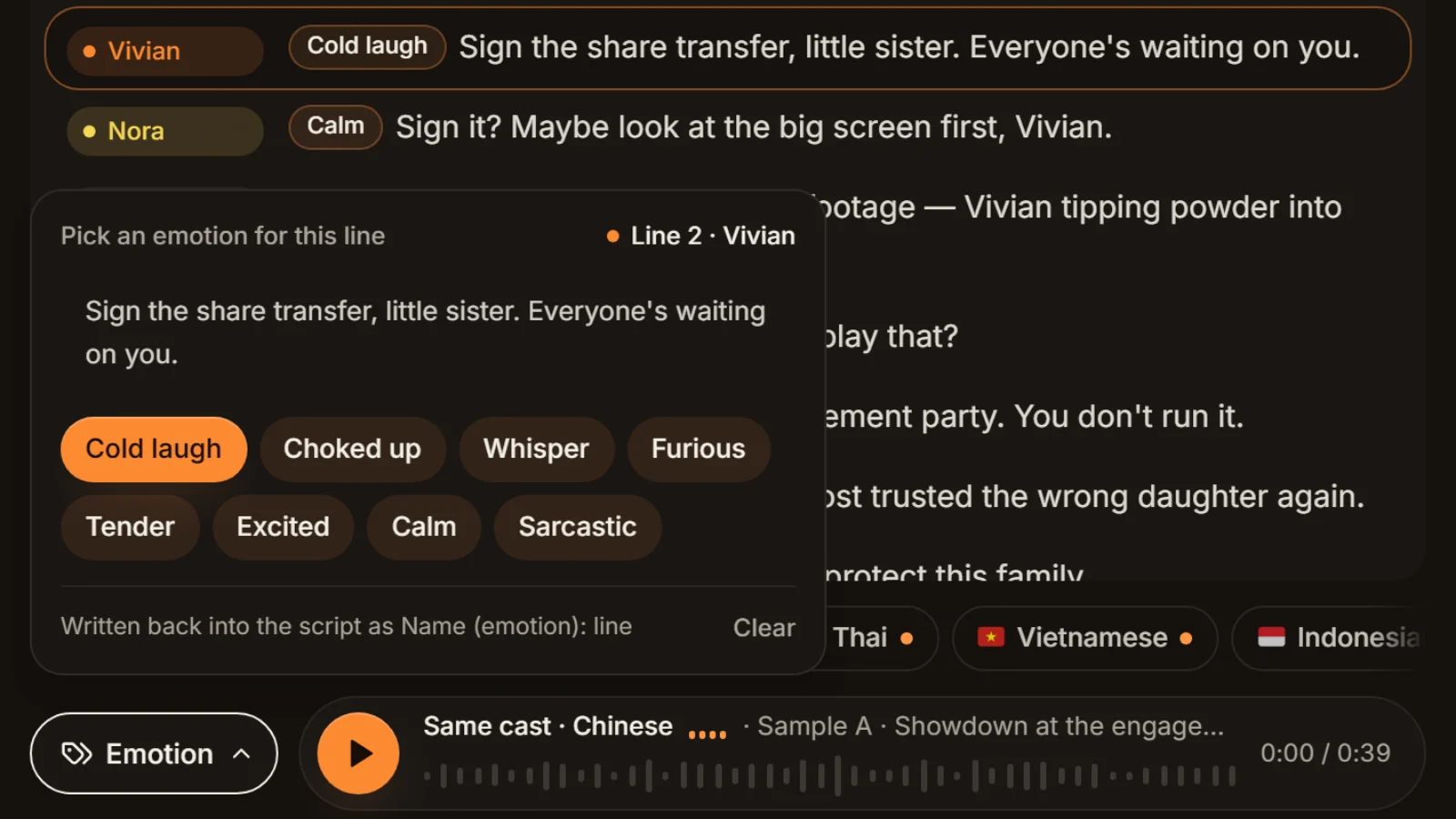
When a name gives no gender hint, the voice is assigned at random, so glance at the cast list and swap anything wrong with the button beside the speaker. Click any line to pick one of eight emotions; it's written back as “Name (emotion): line”.
Tip · Don't tag every line. Tagging only the turns makes a conversation sound more like real people.
Tick English (and any other language you want) and generate. You get one MP3 with the conversation in order and an SRT with one cue per line; failed lines are refunded and can be regenerated on their own.
The first time, voices are assigned from the names. The studio doesn't read what people say — it only looks for gender hints in the name — so naming is the quickest setting you have.
| Name in your script | First assignment | Why |
|---|---|---|
| A, B | Random; both may come out male | Letters carry no gender hint |
| Host, Guest, Customer, Agent | Random | Roles carry no gender |
| Man, Woman | Random | Neither word is on the studio's list |
| Nina, Sam (first names only) | Random | English first names aren't recognised |
| Mr Cole, Sir Roland, Dad, Boy | Male | Titles and family words on the male list |
| Ms Hart, Lady Mira, Mom, Girl | Female | Titles and family words on the female list |
We tried the sample conversation below both ways. Named Ms Hart and Mr Cole, she got a female voice and he got a male one. Renamed Nina and Sam, Sam came out with the bright female voice Sweetheart. Nothing was wrong with the script — a first name just isn't a hint.
After gender there is a second layer. Male names with Father, Dad, Uncle, Master or Old lean towards an older voice; names with boy, girl, young or little lean towards youthful voices; and if at least half of a speaker's tagged lines are cold laugh, sarcastic or furious, they lean towards commanding voices like The CEO or Ice Queen. Within one conversation the studio avoids giving two people the same voice, rotating through six female and eight male voices before it repeats one.
Names are only labels
Speaker names are never read aloud and never appear in the subtitles. So you can label him “Mr Cole” even if the dialogue calls him Sam — or keep A and B and swap the voices once in the cast list before you generate.
Here is a short reunion scene we wrote ourselves: two people, eight lines, one emotion each. Copy it into the studio to try.
| # | Name (emotion) | Line |
|---|---|---|
| 1 | Ms Hart (calm) | Three years, and you still order a plain black coffee. |
| 2 | Mr Cole (excited) | Nina? When did you get back? |
| 3 | Ms Hart (sarcastic) | Last week. Why — worried I came to settle the score? |
| 4 | Mr Cole (whisper) | About that night. I've wanted to explain for years. |
| 5 | Ms Hart (cold laugh) | Explain? You left without a single message. |
| 6 | Mr Cole (choked up) | My mother was rushed to hospital that day, and I lost my phone… |
| 7 | Ms Hart (tender) | …Is she all right now? |
| 8 | Mr Cole (calm) | Much better. She keeps asking when you'll come for dinner again. |
Half of Ms Hart's tagged lines are sarcastic or cold laugh, so the studio leans her towards Ice Queen; Mr Cole gets The CEO. Want her softer? Swap her to Gentle Heart or Elegant Lady in the cast list. Prefer native English voices? Lily and Brian speak English only and suit an English-only release.
Adding a speaker just means adding a name; there is no fixed limit. Panel chats, family scenes and group sketches all work the same way. Keep each name identical throughout: “Cole” in one row and “Mr Cole” in the next become two people with two voices. If you're producing a whole drama with many characters and a narrator driving the plot, see multi-character dubbing, which covers casting and managing a full series.
Speakers are split by name, the same name always means the same voice, and two people avoid sharing one.
Cold laugh, choked up, whisper, furious, tender, excited, calm, sarcastic: the same person can argue in one line and soften in the next.
Every speaker's lines are joined in conversation order into a single file, with no exporting and stitching per voice.
Each cue starts and ends where its line sits in the MP3, so subtitles drop onto your timeline already aligned.
Write in English or Chinese; a conversation can also be voiced in eight more languages by the same pair of voices.
In a two-person dialogue, the bigger the contrast, the easier it is to follow. Here are pairs of real library voices for common situations, all with previews; the first six speak all nine languages, the last two speak English only.
Deep · commanding
● Couple · him
Deep and commanding; holds up in a fight or a confession.

Bright · playful
● Couple · her
Bright and playful; next to a deep male voice, nobody mixes them up.

Confident · tech
● Interview · host
Confident and quick, good for questions and links.
Mature · poised
● Interview · guest
Mature and poised, comfortable with long answers.

Warm · grounded
● Family · father
Warm and grounded; names with Dad or Uncle often get it automatically.
Soft · soothing
● Family · daughter
Soft and soothing, a natural match for a parent's voice in a tender scene.

American · sweet
● English-only · her
Lily: sweet American English, for conversations that never leave English.

American · deep
● English-only · him
Brian: deep American English; pairs with Lily.
Couples arguing, a boss and an intern, a customer and a clerk: drop the MP3 and SRT into CapCut, add visuals, and the subtitles are already timed.
Ordering food, asking the way, a job interview: two distinct voices and line-timed subtitles make listening material easy to follow.
A host-and-guest script you've already written, voiced one person per voice. AI Drama Voice doesn't write the script; it's for content that only lacks voices.
Tick Spanish, Portuguese or Japanese and each line is rewritten as natural speech, voiced by the same pair.
The result of dialogue text to speech is a single MP3: every line in order, 44.1 kHz mono, each line peak-levelled so the volume doesn't jump when the speaker changes. Each SRT cue is one line without a name; to tell speakers apart on screen, give each person's subtitles a different colour or position in your editor.
There is a fixed 0.35-second pause between lines that you can't change within a run. Two people speaking at once, one cutting the other off, a laugh over someone's line — none of that is possible. For a longer pause, stretch the gap in your editor; for an interruption that sounds like one, keep the interrupted line short and end it with a dash or an ellipsis.

The studio doesn't export separate tracks. If you need one file per line or per person — to put each voice on its own video track, say — run the exported MP3 and SRT through split audio by subtitles to get one file per line, then sort them by speaker against your script.
To put music under the conversation, mix it in your browser with add background music. For getting more out of emotion tags, see emotional AI voice.
“Hart: You came. Cole: Yes.” on one row counts entirely as Hart's line. New speaker, new row.
Don't switch between “Cole” and “Mr Cole”. Put nicknames inside the line (“Sam, you came”) and use the name only as a label.
Three or four key emotions in eight lines is plenty; leave the rest calm or untagged so the changes stand out.
If a “Huh?” or a “Hmph” should be heard, write it in; tags change delivery, they don't add sounds.
Try the opening four lines in the demo to check how the two voices sit together, then paste the whole conversation into the studio.
Write it one line per row as “Name: line”, paste it into the dubbing studio and click Find roles, check the two voices, tick a language and generate. You get one MP3 with the conversation in order and a line-timed SRT.
The studio assigns them from the names: Mr, Sir, Dad and Boy get male voices; Mrs, Ms, Lady, Mom and Girl get female ones; A, B, Host and plain first names are random. If one is wrong, click the button beside the speaker in the cast list and pick another voice.
There's no fixed limit; adding a speaker means adding a name. Automatic casting rotates through six female and eight male voices before repeating, and you can recast by hand from 16 voices that speak every language plus English-only ones. One run takes up to 8,000 characters and 400 lines.
Yes. Write the script in English and the studio splits speakers by “Name: line” just the same. Titles like Mr, Ms, Sir and Lady help it pick genders first time, and you can switch to the English-only voices Lily, Brian or Arthur.
Yes. Add brackets after the name, like “Ms Hart (cold laugh): Explain?”, or click a line in the studio and pick an emotion. There are eight: cold laugh, choked up, whisper, furious, tender, excited, calm and sarcastic. The bracketed word is never spoken.
Yes. Every run exports an SRT with one cue per line, timed to where that line sits in the MP3. Cues contain the line only, without names; colour each speaker's subtitles differently in your editor to tell them apart.
Same studio, different job. This page is about conversations of two to four people — story videos, role-plays, interview scripts — where naming and voice pairing matter most. Multi-character dubbing covers whole dramas with many characters and a narrator, where casting and series management matter most.



Write the dialogue, confirm the voices, and generate one MP3 with line-timed subtitles; the visuals are up to your editor.
Billed by characters generated · Failed runs refunded automatically · Alipay, WeChat Pay and cards
